Actions
개발 #10
closed[스터디] AI 모델서빙 관련내용 확인
Start date:
06/16/2025
Due date:
06/20/2025
% Done:
100%
Estimated time:
26:00 h
Files
Updated by 개발팀 이석화 about 1 year ago
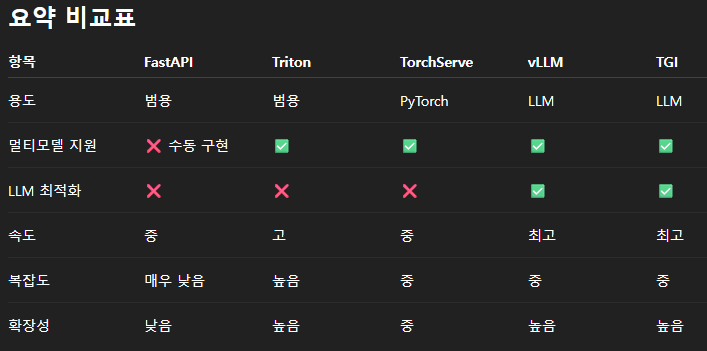
모델서빙 프레임워크
- 클라이언트에게 모델 예측 결과를 효율적으로 전달하기 위한 프레임워크
- Ollama
- 접근성은 좋지만 성능은 떨어진다.
- 로컬 개발용으로 주로 사용
- vLLM
- 접근성보다 성능을 중점으로 사용되는 프레임워크
- 주로 운영환경에서 사용
- 텍스트 생성형 LLM 만 배포가능
- 한번에 하나의 모델만 배포 (프로세스 여러개 띄우는 식은 가능) (메모리는 할당되지만, GPU 는 필요시에만 사용됨)
- Open API 형태로 API 자동 배포 (open-webui 와 같이 사용가능)
- Nvidia Triton
- 성능을 중점으로 사용되는 프레임워크
- 한번에 여러개의 모델 배포가능 (메모리는 할당되지만, GPU 는 필요시에만 사용됨)
- 설정이 어렵고 배포되는 API는 Open API 형태가 아님
- 사용을 위해서는 모델을 .onnx 형태로 변환해야 한다
테스트 현황
- vLLM 배포 후 API 사용
- vLLM 배포 후 open-webui 사용 (모델에 따라선 지원 안됨)
- Triton 배포 후 API 사용
- fastAPI 사용하여 컴퓨터 비전 관련 AI 사용
Updated by 개발팀 이석화 about 1 year ago
vLLM 환경 설정
docker run -it --name vllm --gpus all --restart always -p 8000:8000 debian:stable-slim /bin/bash

curl -LsSf https://astral.sh/uv/install.sh | sh
uv self update
uv venv --python 3.12 --seed
source .venv/bin/activate
uv pip install vllm --torch-backend=auto

apt install -y build-essential
vllm serve openbmb/MiniCPM4-0.5B --trust-remote-code --gpu-memory-utilization 0.5

-------------------

docker run -d -p 3000:8080 --name open-webui -v open-webui:/app/backend/data --restart always ghcr.io/open-webui/open-webui:main
onnx 변환 py 파일
import torch
from transformers import AutoTokenizer, AutoModelForCausalLM

model_id = "openbmb/MiniCPM4-0.5B"
onnx_output_path = "minicpm.onnx"

print("모델과 토크나이저 로딩 중...")
tokenizer = AutoTokenizer.from_pretrained(model_id, trust_remote_code=True)
model = AutoModelForCausalLM.from_pretrained(model_id, trust_remote_code=True)
model.eval()

# Cache 관련 문제를 우회하기 위해 forward wrapper 생성
class MiniCPMWrapper(torch.nn.Module):
    def __init__(self, model):
        super().__init__()
        self.model = model

    def forward(self, input_ids, attention_mask):
        return self.model(input_ids=input_ids, attention_mask=attention_mask, use_cache=False).logits

wrapped_model = MiniCPMWrapper(model)

print("샘플 입력 생성 중...")
text = "안녕하세요, ONNX 변환 테스트 중입니다."
inputs = tokenizer(text, return_tensors="pt")
input_ids = inputs["input_ids"]
attention_mask = inputs["attention_mask"]

print("ONNX로 변환 중...")

torch.onnx.export(
    wrapped_model,
    args=(input_ids, attention_mask),
    f=onnx_output_path,
    input_names=["input_ids", "attention_mask"],
    output_names=["logits"],
    dynamic_axes={
        "input_ids": {0: "batch", 1: "seq_len"},
        "attention_mask": {0: "batch", 1: "seq_len"},
        "logits": {0: "batch", 1: "seq_len", 2: "vocab_size"},
    },
    opset_version=17,  # 반드시 14 이상
    do_constant_folding=True
)

print(f"ONNX 변환 완료: {onnx_output_path}")
Nvidia Triton 설정
# Triton 기본 서버
docker run --gpus=1 --rm -p8000:8000 -p8001:8001 -p8002:8002 -v D:\model_repository:/models nvcr.io/nvidia/tritonserver:25.05-py3 tritonserver --model-repository=/models

# Triton 클라이언트
docker pull nvcr.io/nvidia/tritonserver:25.05-py3-sdk
docker run -it --rm --net=host nvcr.io/nvidia/tritonserver:25.05-py3-sdk
# Triton vLLM 백엔드 서버
docker pull nvcr.io/nvidia/tritonserver:25.05-vllm-python-py3

docker run --gpus all -it --rm -p 8002:8002 -p 8001:8001 -p 8000:8000 --shm-size=1G --ulimit memlock=-1 --ulimit stack=67108864 -v D:\:/work -w /work nvcr.io/nvidia/tritonserver:25.05-vllm-python-py3 tritonserver --model-repository ./model_repositor
Updated by 개발팀 이석화 about 1 year ago
Triton 모델 설정
-
D:\model_repository폴더의 모델 구성방법 - 일반 Triton 모델 구조
-
모델명-
1 (버전명)model.onnx
config.pbtxt
-
-
name: "minicpm"
platform: "onnxruntime_onnx"
max_batch_size: 0

input [
  {
    name: "input_ids"
    data_type: TYPE_INT64
    dims: [ -1, -1 ]
  },
  {
    name: "attention_mask"
    data_type: TYPE_INT64
    dims: [ -1, -1 ]
  }
]

output [
  {
    name: "logits"
    data_type: TYPE_FP32
    dims: [ -1, -1, 73448 ]  # MiniCPM vocab size
  }
]
- vllm 백엔드 Triton 모델 구조
-
모델명-
1 (버전명)model.json
config.pbtxt
-
-
backend: "vllm"

# The usage of device is deferred to the vLLM engine
instance_group [
  {
    count: 1
    kind: KIND_MODEL
  }
]
{
    "model":"nicholasKluge/Aira-2-355M",
    "disable_log_requests": true,
    "gpu_memory_utilization": 0.5,
    "enforce_eager": true,
    "trust_remote_code": true
}
Actions